 KemptDesk
Quick answer
The best CleanMyMac alternative in 2026 is KemptDesk: $59 lifetime for 2 computers, Mac or PC, against $119.95 for a one-time CleanMyMac license for 1 Mac, plus a free full scan. For free tools, use AppCleaner to remove apps, OnyX for maintenance, Mole in Terminal and GrandPerspective for a disk map.
On this page
- The best CleanMyMac alternatives, ranked
- The apps side by side
- What a CleanMyMac alternative costs over 3 years
- Why people look for a CleanMyMac alternative
- Which CleanMyMac tools each alternative replaces
- CleanMyMac: the reference point
- KemptDesk: best overall CleanMyMac alternative
- Free and open-source CleanMyMac alternatives
- Paid one-time CleanMyMac alternatives
- macOS Storage settings
- How to choose
- Questions
- Sources
We make KemptDesk, so weigh our view with that in mind. Every fact about other apps comes from their own pages or from the reviews linked below, checked on November 25, 2026.
Prices change often and many vendors show sale prices. Where a vendor page did not load for us, we use Macworld's review of July 20, 2026, or a dated reseller listing, and we say so.
The best CleanMyMac alternatives, ranked
- KemptDesk: best overall. Lifetime price, a color for every item, and Mac and PC on one license.
- AppCleaner: best free uninstaller. Drop an app on it to remove the app and its leftovers.
- OnyX: best free maintenance tool. System scripts, cache cleanup and hidden settings.
- Mole: best free tool for Terminal users. Open source, with a dry run before every clean.
- GrandPerspective: best free disk map. Open source, with a tree map of every file.
- DaisyDisk: best paid disk map. $9.99 one time.
- MacCleaner Pro: largest paid toolkit. Five utilities in one purchase.
- BuhoCleaner: frequent low lifetime deals from resellers.
- DataSweeper: $9.99 one time on the Mac App Store, and it moves items to the Trash.
- Purge: free, open source, and everything it removes goes to the Trash.
- Pearcleaner: free uninstaller, but its development is on hold.
- macOS Storage settings: built in and free. Always check it first.
The apps side by side
| App | Platform | Price | Free option | Type | Best for |
|---|---|---|---|---|---|
| CleanMyMac (for reference) | Mac | Basic: $47.50/year or $119.95 one time, 1 Mac (Macworld) | Trial, cleans up to 500 MB | All-in-one cleaner | One app for cleaning, malware and updates |
| KemptDesk | Mac and PC | $9.99 for the first year if bought by 31 December 2026, then $24.99/year, or $59 lifetime, 2 computers | Full scan; cleans up to 500 MB | Cleaner that explains folders | Lifetime price, review before removal |
| AppCleaner | Mac | Free (donations) | Yes | Uninstaller | Removing apps and their leftovers |
| OnyX | Mac | Free (donations) | Yes | Maintenance utility | Power users and system tasks |
| Mole | Mac | Free, GPL-3.0 | Yes | Command-line cleaner | People who use Terminal |
| GrandPerspective | Mac | Free; $2.99 on the App Store | Yes | Disk map | Seeing what fills the disk, free |
| DaisyDisk | Mac | $9.99 one time | Free download to try | Disk analyzer | A polished disk map |
| MacCleaner Pro | Mac | $29.95/year or $74.95 one time, 1 Mac (Macworld) | 2-day trial | Cleaner bundle | Many tools in one purchase |
| BuhoCleaner | Mac | Lifetime bundle for 3 Macs: $29.99 (StackSocial, May 2026) | Check Dr.Buho's page | All-in-one cleaner | A low one-time price |
| DataSweeper | Mac | $9.99 one time (Mac App Store) | No | Cleaner | System Data and large files |
| Purge | Mac | Free, MIT | Yes | Cleaner | Cleanup that only uses the Trash |
| Storage settings | Mac | Built in | Yes | macOS feature | A first check at no cost |
What a CleanMyMac alternative costs over 3 years
A yearly plan looks cheap until you add up the years. This table multiplies each vendor's yearly price by 3 and puts it next to the one-time price.
| App | 3 years on the yearly plan | One-time price | What the one-time price includes |
|---|---|---|---|
| CleanMyMac Basic, 1 Mac | $142.50 | $119.95 | Updates for the current major version only (MacPaw) |
| KemptDesk Personal, 2 computers | $59.97 if bought by 31 December 2026 ($9.99 + $24.99 + $24.99; normally $74.97) | $59 | Every update, for as long as KemptDesk is developed |
| MacCleaner Pro, 1 Mac | $89.85 | $74.95 | See Nektony's store |
| DaisyDisk | No yearly plan | $9.99 | A disk map, not a cleaner |
Why people look for a CleanMyMac alternative
People usually want one of four things: a lower price, a license they pay for once, more control over each file, or more certainty that nothing important goes. Macworld's July 2026 review lists "Expensive compared to rivals" and "Duplicates macOS built-in tools" among CleanMyMac's cons. It also calls it "Very easy to use".
Most of the space a cleaner finds sits in a few places: caches, old downloads, app leftovers and developer data. Our guide to what fills a Mac and what is safe to delete lists them in the order to check.
Which CleanMyMac tools each alternative replaces
| CleanMyMac tool | Free replacement | KemptDesk |
|---|---|---|
| Smart Care (one-click cleanup) | OnyX, Mole, Purge | Smart Care: junk, large files, duplicates, apps and hidden folders in one list |
| Space Lens (disk map) | GrandPerspective; DaisyDisk is paid | Space Lens: a box map colored by what you can do |
| Applications (uninstaller) | AppCleaner | Apps and leftovers |
| My Clutter (large, old and duplicate files) | Finder searches | Large and old files; duplicates by content |
| Protection (malware removal) | No tool on this page | Not included |
| App updater | No tool on this page | Not included |
CleanMyMac: the reference point
Macworld lists CleanMyMac Basic for 1 Mac at $9.95 a month, $47.50 a year or $119.95 one time. Plus for 1 Mac costs $15.95 a month, $71.40 a year or $195.95 one time. MacPaw's product page says "Starting at $3.33/month" and requires macOS 11 or later.
MacPaw's support page says a one-time purchase "includes only updates and fixes for your current major version", while a subscription also covers future major versions. Keep that in mind when you compare lifetime prices.
CleanMyMac does more than clean. Its page lists malware detection, an app updater, memory and CPU tools, and cloud storage cleanup. No alternative on this page matches all of that in one app. If you use those parts, staying may be the right choice.
KemptDesk: best overall CleanMyMac alternative
KemptDesk is a disk clean-up app for Mac and PC by an independent developer. It sorts every item into five colors: Safe to clean, Check first, Breaks an app, Your files and Protected. Only items in Safe to clean are selected for you. A folder KemptDesk does not recognize is treated as yours.
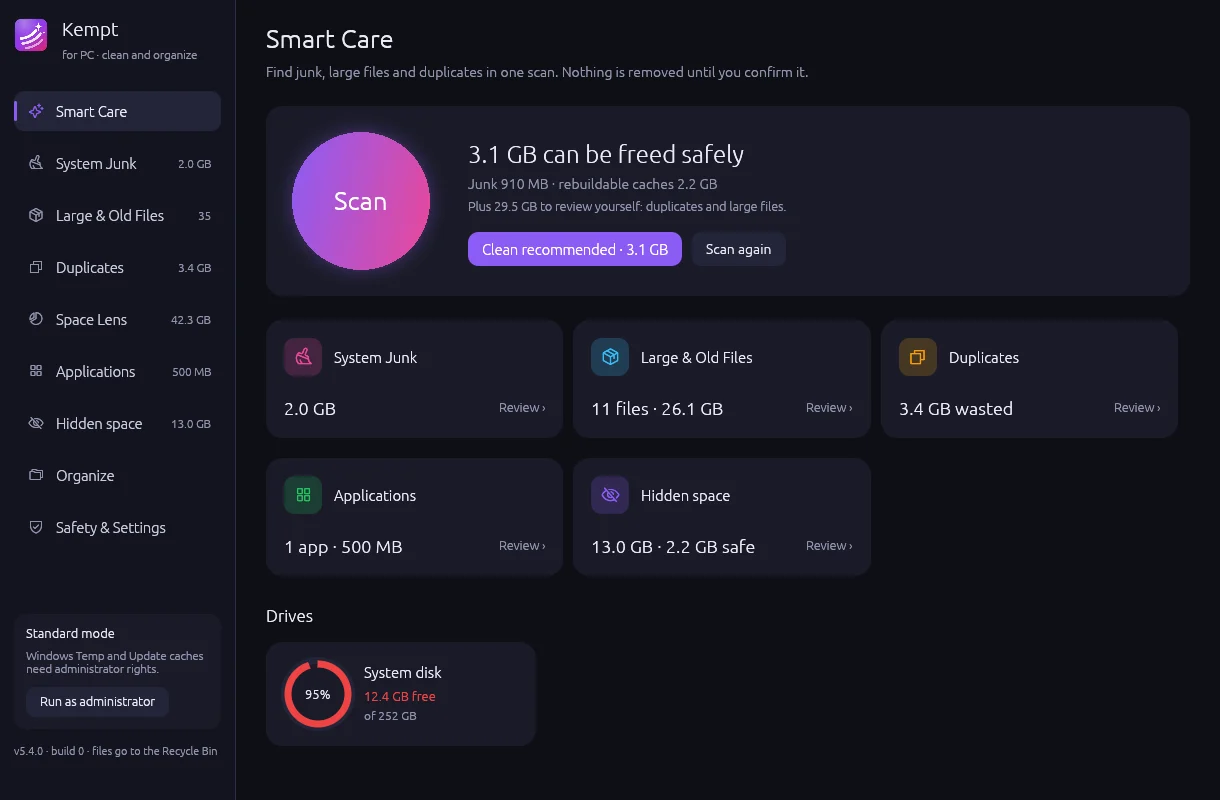
KemptDesk does the jobs of several apps on this list in one window. Smart Care puts junk, large files, duplicates, apps and hidden folders in one list. Space Lens draws a box map of the disk. Apps and leftovers removes apps fully. Smart Organize proposes a layout for a messy folder, and one click undoes the run.
Nothing is removed without review. Your files go to the Trash first. Junk is deleted directly: caches, temporary files, old logs and crash reports, each marked "permanent" in the review before you confirm. KemptDesk checks each file again before removal, skips files that changed, and writes every removal to a log.
KemptDesk has no account and never uploads files or file names. It goes online only for update checks and license checks.
The free version runs the full scan, the Space Lens map and every explanation, and cleans up to 500 MB in total, with no card. Paid plans are $9.99 for the first year if you buy by 31 December 2026 (then $24.99 a year) or $59 lifetime for 2 computers, up to $149 lifetime for 5. One license can mix Macs and PCs. Every plan has a 30-day refund. See KemptDesk plans and prices.
Where others win: KemptDesk has no malware scanner and no app updater, unlike CleanMyMac. It is new, with no track record yet, and it needs macOS 13 or later. The first time it opens, macOS shows a warning for apps from independent developers; the install steps explain what to click.
Free and open-source CleanMyMac alternatives
These tools cost nothing. Each one does one or two of CleanMyMac's jobs, so most people combine two or three of them.
AppCleaner
AppCleaner from FreeMacSoft is a free uninstaller. You drop an app on its window and it finds the files the app spread across your system. Version 3.7 is for macOS 15 and later; older versions exist for older systems.
Where it beats KemptDesk: it is free and does one job well. It does not clean caches or explain other folders. Our guide on how to uninstall apps completely shows which leftover folders are safe to remove.
OnyX
OnyX from Titanium Software is free, with an optional donation. It verifies the structure of system files, runs maintenance tasks, deletes caches, rebuilds databases and indexes, and changes hidden settings in Finder, Dock and Safari.
The developer warns that there is a specific version of OnyX for each major macOS version: "Use the correct version". Macworld calls it an "Excellent utility" but also "Intimidating", and says it is best for power users.
Where it beats KemptDesk: it is free, and it runs system maintenance tasks that KemptDesk does not offer. It explains less, so read each option before you run it.
Mole
Mole is a free, open-source command-line tool under GPL-3.0. Its developer also sells Mole for Mac, a separate app with a window that is closed source: $19 one time for 2 Macs, first released in May 2026, for macOS 14 or later. A Mac license does not activate the Windows version. You install the command-line tool with Homebrew and run commands in Terminal:
brew install mole
mo clean --dry-run
The first command installs Mole. The second shows what mo clean would remove, without removing anything. Other commands include mo uninstall, mo analyze, mo purge for project build files and mo installer for old installer files.
Mole has a whitelist to protect items and logs cleanup to ~/Library/Logs/mole/operations.log. Where it beats KemptDesk: it is free, open source and scriptable. It suits people who are comfortable in Terminal.
GrandPerspective
GrandPerspective is a free, open-source disk map under the GNU General Public License. It draws a tree map where each box is a file, sized by how much space it uses. The App Store version costs $2.99; the developer says it is the same app.
The latest version, 3.8.1 from September 13, 2026, needs macOS 14. Older versions exist for older systems. Where it beats KemptDesk: it is free and shows the whole disk at once. It does not say what is safe to delete, so you decide for each file.
Purge
Purge is a free, open-source Mac cleaner under the MIT license. It finds app caches, developer tool files, large files and app leftovers. Everything it removes goes to the Trash first, and an allowlist in its code decides what it can touch.
Where it beats KemptDesk: it is free and you can read its code. It is a young project, so check its release notes before you rely on it.
Pearcleaner
Pearcleaner is a free, source-available uninstaller that also finds orphaned files. Its maintainer marks the project "On Hold" and says development largely stopped at the end of 2025, so AppCleaner is the safer pick for new installs.
Paid one-time CleanMyMac alternatives
DaisyDisk
DaisyDisk is a disk analyzer, not a cleaner. It draws a map of your disk so you can see what is large, then you choose what to delete. The developer sells it for $9.99 as a one-time purchase, "not a subscription", and it runs on macOS 10.13 or newer.
The site says system files "are automatically safeguarded". It can also scan Dropbox, Google Drive, OneDrive and Box. Where it beats KemptDesk: it costs far less, runs on older macOS versions, and scans cloud drives. We compare the two in detail in DaisyDisk versus KemptDesk.
MacCleaner Pro
MacCleaner Pro by Nektony is a bundle. Macworld says it includes App Cleaner & Uninstaller, Disk Space Analyzer, Duplicate File Finder, Memory Cleaner and Funter. Macworld lists $29.95 a year or $74.95 one time for 1 Mac. Nektony's own store showed changing discounts, so confirm the price at checkout.
Nektony says it asks for confirmation before it cleans any files, and it needs macOS 11 or later. The trial runs for 2 days. Where it beats KemptDesk: a duplicate finder with folder compare and merge, a memory cleaner, and startup item and browser extension tools.
BuhoCleaner
BuhoCleaner from Dr.Buho cleans junk, removes apps, finds duplicates and large files, and manages startup apps. Resellers often sell lifetime licenses: in May 2026, StackSocial listed a Dr.Buho bundle with BuhoCleaner for 3 Macs at $29.99, and that listing says it needs macOS 14 or later.
We could not check Dr.Buho's own store on the review date, so treat reseller prices as offers that end. Where it beats KemptDesk: a low one-time price for several Macs, plus memory and startup tools. It runs only on Macs.
DataSweeper
DataSweeper is a Mac App Store app for $9.99, with no subscription. It finds System Data, duplicates, junk and large files, and moves them to the Trash so you can review them before they are gone.
Where it beats KemptDesk: it costs less and comes from the Mac App Store. It runs only on Macs, and it has no free version.
macOS Storage settings
macOS has its own storage tools. Open the Apple menu, then System Settings, General, Storage. You see a bar of what uses space and recommendations such as Store in iCloud, Optimize Storage and Empty Trash automatically.
It is free and cannot remove system files by mistake. It does not explain caches or hidden folders well, and much of the space often shows as "System Data". Our guide on what System Data contains explains that part.
How to choose
- You want one app that explains each item, at a lifetime price: KemptDesk ($59 lifetime, 2 computers).
- You also have a Windows PC: KemptDesk, because one license covers both. See cleaners for Mac and PC with one license.
- You want it free and are technical: OnyX or Mole.
- You only want to remove apps fully: AppCleaner.
- You only want to see what is large: Storage settings, then GrandPerspective or DaisyDisk.
- You want malware scanning and app updates in the same app: stay with CleanMyMac.
Questions
What is the best CleanMyMac alternative?
We think KemptDesk is the best all-round choice: $59 lifetime for 2 computers, a free full scan, and a color for every item before anything is removed. For a free set, combine AppCleaner, OnyX and GrandPerspective.
Is there a free alternative to CleanMyMac?
Yes. macOS Storage settings, AppCleaner, OnyX, Mole, GrandPerspective and Purge are free. KemptDesk's free version scans everything and cleans up to 500 MB in total.
Is there a CleanMyMac alternative with a lifetime license?
Yes. KemptDesk costs $59 lifetime for 2 computers, DaisyDisk and DataSweeper cost $9.99 one time, and Macworld lists MacCleaner Pro at $74.95 one time. MacPaw says a one-time CleanMyMac purchase covers only the current major version.
Is there a CleanMyMac alternative that also works on Windows?
Yes. KemptDesk runs on macOS 13 or later and Windows 10 or 11, and one license counts computers, not systems. MacPaw's pages name no Windows version of CleanMyMac.
Is it safe to delete caches on a Mac?
Most caches in ~/Library/Caches are rebuilt by their apps, but some hold data you may want. Our guide to Library caches lists which to keep.
Sources
- CleanMyMac product page (MacPaw)
- One-time purchase or subscription (MacPaw Support)
- CleanMyMac alternatives, with CleanMyMac's tools listed (MacPaw)
- AppCleaner (FreeMacSoft)
- OnyX (Titanium Software)
- Mole on GitHub
- Mole for Mac (mole.fit)
- GrandPerspective (SourceForge)
- DaisyDisk (Software Ambience)
- MacCleaner Pro (Nektony)
- MacCleaner Pro store (Nektony)
- The Dr.Buho Mac Utility Lifetime Bundle (StackSocial)
- Clear out storage for up to 3 Macs with BuhoCleaner (Boing Boing, May 9, 2026)
- DataSweeper (Mac App Store)
- Purge (AlternativeTo)
- Purge (Product Hunt)
- Pearcleaner on GitHub
- Free up storage space on your Mac (Apple Support)
- Best Mac Cleaner Apps 2026: Tested & Compared (Macworld, July 20, 2026)
Product names on this page are trademarks of their owners. KemptDesk is not affiliated with or endorsed by them.