 KemptDesk
Quick answer
DaisyDisk and KemptDesk solve different problems. DaisyDisk is a $9.99 one-time disk analyzer that shows what fills your Mac, and you decide what to delete. KemptDesk is a cleaner that explains each folder and selects only items that are safe to clean. If you already know your files, DaisyDisk is enough and cheaper.
On this page
We make KemptDesk, so weigh our view with that in mind. Every fact about other apps comes from their own pages or from the reviews linked below, checked on November 23, 2026.
Both apps draw a map of the disk. The difference is what happens after you find a large folder: DaisyDisk leaves the decision to you, and KemptDesk tells you what the folder is and what breaks if you remove it.
The two apps side by side
| App | Platform | Price | Free option | Type | Best for |
|---|---|---|---|---|---|
| DaisyDisk | Mac (macOS 10.13 or newer) | $9.99 one time | Free download to try | Disk analyzer | People who know their files and want a fast visual map |
| KemptDesk | Mac (macOS 13 or later) and PC | $9.99 for the first year if bought by 31 December 2026, then $24.99/year, or $59 lifetime, 2 computers | Full scan and map; cleans up to 500 MB | Cleaner that explains folders | People who are not sure what a folder is or whether it is safe |
| Storage settings | Mac | Built in | Yes | macOS feature | A first look at no cost |
DaisyDisk
DaisyDisk from Software Ambience is a long-established Mac disk analyzer. It scans a disk and shows it as an interactive map of colorful rings, so the largest folders stand out. You click into a folder to go deeper, and you pick what to delete. The site says "Only you decide what to delete."
The developer sells DaisyDisk for $9.99 with a lifetime license and says it is "a one-time purchase, and not a subscription". It runs on macOS 10.13 or newer, on Apple silicon and Intel Macs. It can also scan Dropbox, Google Drive, Microsoft OneDrive and Box.
Macworld's July 2026 review lists these pros: "Quickly scans storage and finds large files", "Graphical representation", "File name previews" and "Can check cloud storage". Its only listed con is "Some user-interface quirks".
Where DaisyDisk beats KemptDesk: it costs much less than any KemptDesk plan, it supports older Macs, it scans cloud drives, and it has a long track record. For many people a map is all they need.
KemptDesk
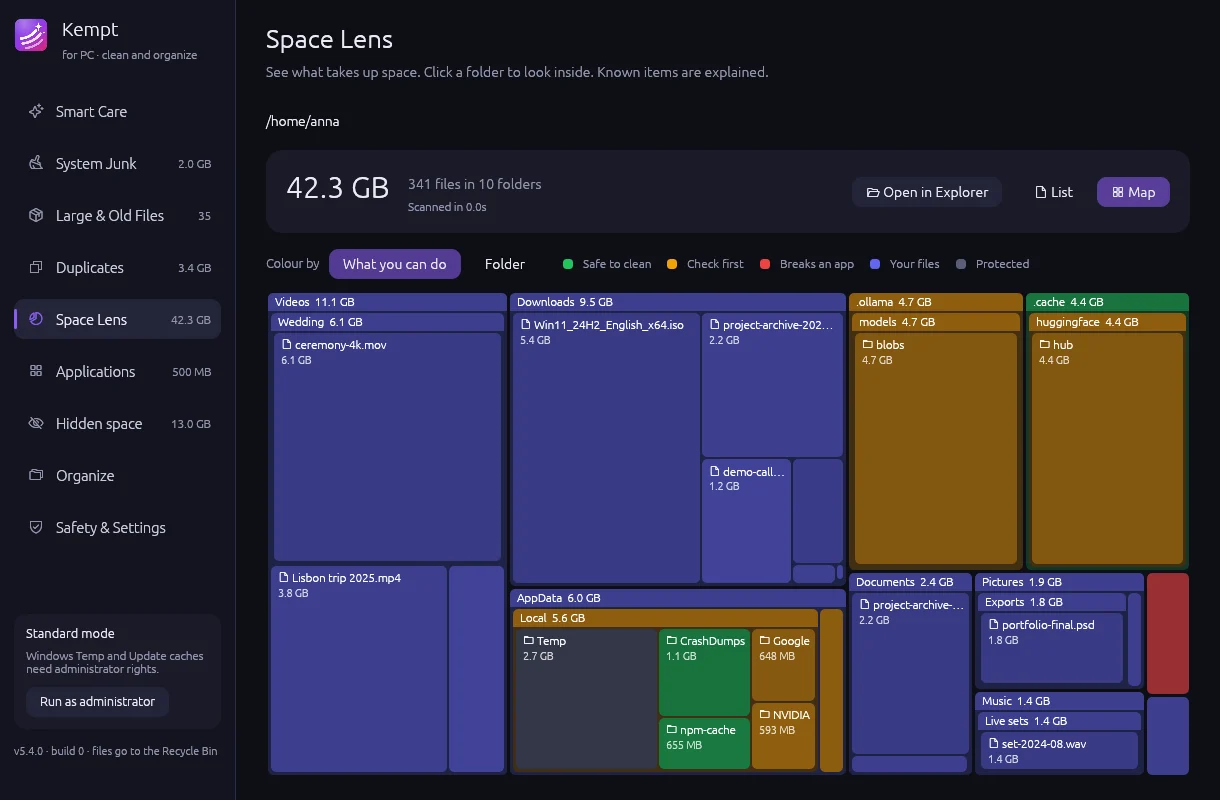
KemptDesk is a disk clean-up app for Mac and PC by an independent developer. Its Space Lens view is also a box map of the disk, but each box is colored by what you can do with it: Safe to clean, Check first, Breaks an app, Your files or Protected.
Only items in Safe to clean are selected for you, such as app caches, browser caches and temporary files. Check first items, such as old phone backups, local AI models and old downloads, show a reason and wait for your decision. A folder KemptDesk does not recognize is treated as yours and is never selected.
The free version includes the full scan, Space Lens, every explanation and Organize previews, and cleans up to 500 MB in total, with no account and no card. Paid plans are $9.99 for the first year if you buy by 31 December 2026 (then $24.99 a year) or $59 lifetime for 2 computers. See KemptDesk plans and prices.
Where KemptDesk is weaker: it costs more, it needs macOS 13 or later, it is new with no track record, and it has no cloud drive scan (cloud folders on the Mac are locked). The first time it opens, macOS shows a warning for apps from independent developers; the install steps show what to click.
macOS Storage settings
Before you buy either app, open the Apple menu, then System Settings, General, Storage. macOS shows a bar of what uses space and offers recommendations such as Store in iCloud, Optimize Storage and Empty Trash automatically.
Storage settings is free and safe. It does not show folder detail inside hidden areas, and a large part often appears only as "System Data". Our guide to what fills a Mac and what is safe to delete lists the places to check next.
How each handles hidden space and system files
Some disk space hides in folders that Finder does not show. DaisyDisk's site says a scan as administrator reveals "restricted files and folders that are unreachable in regular scanning mode". That lets you see the size of areas a normal scan misses.
DaisyDisk's site also says "System files are automatically safeguarded." Outside system files, the choice is yours, so you need to know which folders hold data you want to keep.
KemptDesk's Hidden space view lists dot-folders, app data and local AI models, measures each one, and explains it.
Each item carries a label: safe to remove, check first, resets an app, or protected. System folders such as /System, /Library, /Applications and /private are locked. Your photo library and other app libraries are marked check first, and only expert mode unlocks them. Main folders such as Documents and iCloud Drive cannot be deleted as a whole.
KemptDesk also counts Time Machine local snapshots, which macOS includes in System Data. You can remove them with one button; macOS asks for your administrator password first, and your Time Machine backup disk is not touched. Our guide to System Data on a Mac explains snapshots and the other parts.
How deletion works in each
In DaisyDisk you remove items with drag and drop. Macworld notes that deletions are user-driven, with a countdown window before they happen.
In KemptDesk nothing is removed without review. Your files go to the Trash first, so you can restore them. Junk is deleted directly, because apps make it again: caches, temporary files, old logs and crash reports. The review marks these items "permanent" before you confirm. KemptDesk checks each file again just before removal, skips files that changed since the scan, and writes every removal to a log.
What each costs over time
DaisyDisk is one payment of $9.99 for a lifetime license. The developer does not describe a paid upgrade on the page we read.
KemptDesk has yearly and lifetime plans. Personal covers 2 computers for $9.99 for the first year if you buy by 31 December 2026, then $24.99 a year, or $59 lifetime. Home covers 3 computers for $39.99 a year or $99 lifetime. Family covers 5 computers for $59.99 a year or $149 lifetime.
A KemptDesk lifetime license includes every update for as long as KemptDesk is developed. Every KemptDesk plan has a 30-day refund. A license counts computers, not systems, so one plan can cover a Mac and a PC.
When DaisyDisk is enough
- You know what most of your folders are, and you mainly need to find the big ones.
- The space is in your own files: videos, old projects, disk images, downloads.
- You want to check a cloud drive or an external disk.
- You want the lowest price, or your Mac runs a macOS version older than 13.
In these cases DaisyDisk plus Storage settings covers the job for $9.99.
When a cleaner helps
- You find a large folder like
~/Library/Cachesor~/Library/Developerand do not know if it is safe. Our guide to Library caches covers the first one. - You want the safe items selected for you and everything else explained.
- You are a developer with Xcode, npm, Cargo or Gradle data, or you run local AI models.
- You also have a Windows PC; one KemptDesk license counts computers, so Macs and PCs can be mixed.
How to choose
Pick DaisyDisk if you want a cheap, proven map and you are confident deciding what to delete. Pick KemptDesk if you want each folder explained and only safe items selected, or if you need one license across Mac and PC.
You can also use both: KemptDesk's free scan and explanations cost nothing, and cleaning up to 500 MB is free. If you want to compare more Mac cleaners, see our CleanMyMac alternatives.
Questions
Does DaisyDisk delete files?
Yes. You remove items with drag and drop. DaisyDisk does not choose files for you, and its site says system files are safeguarded.
Can DaisyDisk show hidden space and System Data?
DaisyDisk's site says a scan as administrator reveals restricted files and folders that a normal scan cannot reach. KemptDesk also explains hidden folders and counts Time Machine local snapshots.
Which one is safer for a beginner?
KemptDesk selects only items that are safe to clean, explains the rest, and sends your files to the Trash first. DaisyDisk safeguards system files but leaves every other choice to you, so it suits people who know their folders.
Does KemptDesk also work on Windows?
Yes. KemptDesk runs on Windows 10 or 11 as well as macOS 13 or later, and one license can mix Macs and PCs. DaisyDisk is for Mac only.
Can I use DaisyDisk and KemptDesk on the same Mac?
Yes. Both apps only read your disk until you delete something. You can use the DaisyDisk map to find a large folder, then check in KemptDesk what that folder is and whether it is safe to clean. Delete from one app at a time, then scan again in the other.
Is KemptDesk free?
Partly. The scan, the Space Lens map and all explanations are free, and you can clean up to 500 MB in total without paying. Paid plans start at $9.99 for the first year if you buy by 31 December 2026 (then $24.99 a year) or $59 lifetime.
Sources
- DaisyDisk (Software Ambience)
- Free up storage space on Mac (Apple Support)
- Optimize storage space on your Mac (Mac User Guide)
- Best Mac Cleaner Apps 2026: Tested & Compared (Macworld, July 20, 2026)
Product names on this page are trademarks of their owners. KemptDesk is not affiliated with or endorsed by them.